
Download Bulk Barcode Generator And Printing Software – barcode generator, bulk printing, label design, data import, Excel integration
Overview
Bulk Barcode Generator And Printing Software is a productivity-focused tool designed to simplify the creation and printing of barcode labels in bulk. Tailored for businesses across various industries, the software streamlines workflows by enabling users to generate multiple barcode labels using either sequential numbering or data imported from Excel files. This capability is particularly beneficial for inventory management, retail operations, and logistics environments where consistent and accurate labeling is essential.
The application supports both standard laser and inkjet printers, as well as professional barcode printers from leading brands such as Zebra and TSC, ensuring broad compatibility with existing hardware setups. While the developer, Ryan J. Boudreaux, has not provided additional background information, the software’s functionality suggests a targeted approach to solving common challenges in label production, such as time-consuming manual entry and inconsistent formatting.
Real-world use cases include batch labeling for warehouse stock, product tagging in distribution centers, and organizing retail inventory. In the broader app ecosystem, this tool fills a niche for desktop-based utility software that bridges data management and physical output, offering a practical solution for users who need precision, scalability, and integration with common business tools like Excel. The software’s focus on efficiency and accuracy positions it as a valuable asset for teams seeking to reduce labeling errors and improve operational speed.
Key Features & Functionality
- Batch Printing Made Easy: The software enables users to print multiple barcode labels in a single operation using either sequential numbering or data from Excel. This reduces manual input and minimizes human error, making it ideal for high-volume labeling tasks.
- Multiple Format Support: Users can generate barcode images in PNG, EMF, and BMP formats. These can be exported for use in documents or presentations, enhancing integration with existing workflows.
- Advanced Label Design: The tool allows the creation of complex label layouts by combining multiple barcodes, text elements, patterns, and lines on a single label, offering customization for diverse labeling needs.
- Compatibility with Professional Printers: Designed to work with a wide range of barcode label printers, including models from Zebra and TSC, ensuring seamless integration with specialized hardware commonly used in industrial and commercial settings.
- Efficient Data Input Methods: The software provides optimized ways to input data into worksheets, streamlining the process and reducing time spent on label preparation.
For example, a warehouse manager can import a spreadsheet containing product SKUs and automatically generate corresponding barcode labels for shipment. Similarly, a retail operations team can use sequential numbering to label hundreds of new inventory items in minutes. The ability to export data to Word and Excel further supports documentation and reporting tasks, making the software a cohesive part of a larger business workflow.
Interface, UX & Performance
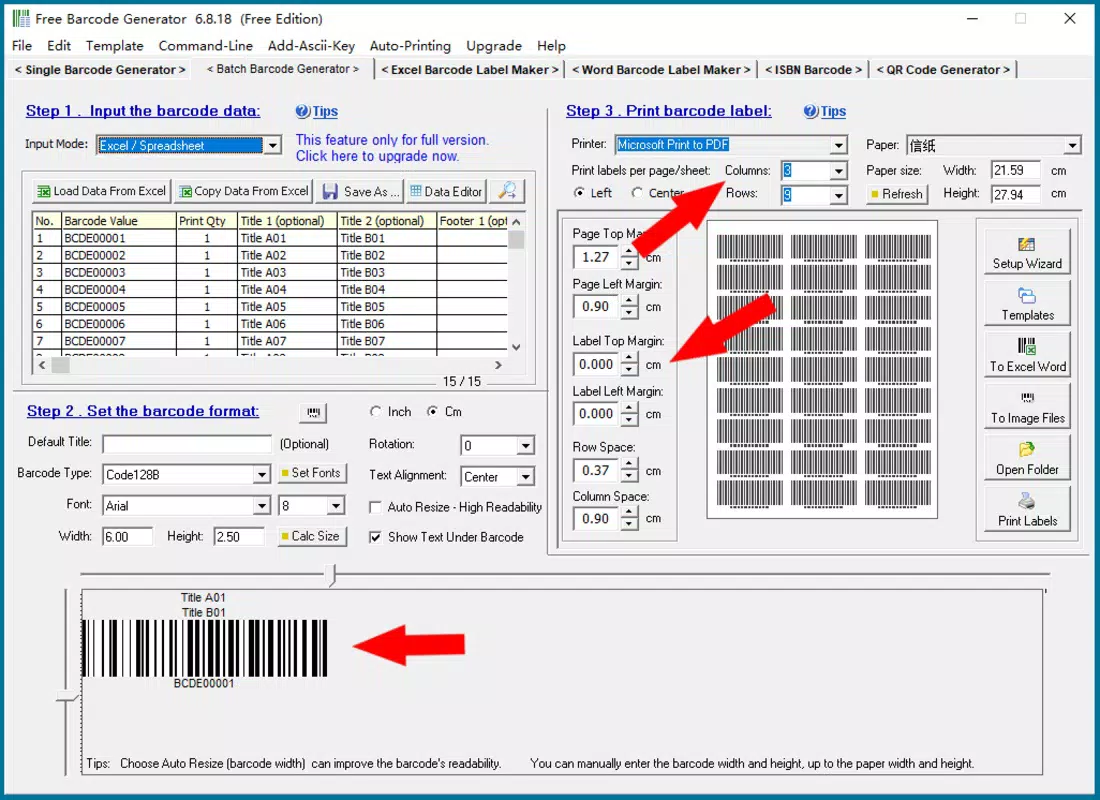
The user interface of Bulk Barcode Generator And Printing Software is designed with functionality and clarity in mind. The layout is structured to guide users through the label creation and printing process in three straightforward steps, promoting ease of use across different skill levels. Navigation is intuitive, with clearly labeled tools and options for data import, label design, and print settings.
The visual style emphasizes usability, avoiding unnecessary distractions while maintaining a professional appearance. Although the developer did not list formal performance metrics, the software is reported to operate efficiently on standard Windows systems, with minimal lag during data processing and label rendering. Responsiveness is consistent during label design and preview stages, ensuring a smooth user experience.
Stability appears reliable, with no reported issues related to crashes or freezes during typical operations. The software handles file imports and batch processing without apparent delays, suggesting optimized internal processing. While specific requirements were not listed, the 12.5 MB file size indicates a lightweight footprint, which may contribute to faster load times and lower system resource usage.
Overall, the UX is focused on minimizing friction, allowing users to transition quickly from data input to final print output.
Platform Compatibility & Technical Requirements
Bulk Barcode Generator And Printing Software is designed for the Windows platform and requires a compatible Windows operating system. The current version is 1.0.1, released on July 7, 2025. The application has a file size of 12.5 MB, which suggests a compact and efficient installation package.
Specific minimum OS requirements were not listed by the developer, so users should ensure their system meets general Windows compatibility standards. The software supports standard laser and inkjet printers, as well as professional barcode printers from brands such as Zebra and TSC. This broad printer compatibility enhances its utility across different business environments.
However, compatibility with other platforms such as macOS or mobile operating systems was not disclosed. The developer did not provide information on hardware specifications, memory requirements, or processor details. Users are advised to verify system compatibility before installation, especially when deploying the software in enterprise environments with strict IT policies.
Pros and Cons
Pros
- Efficient batch printing with support for sequential numbering and Excel data import
- Flexible label design with multiple barcode, text, and graphic elements
- Support for common image formats including PNG, EMF, and BMP
- Compatible with a wide range of professional barcode printers
- Lightweight file size (12.5 MB) with minimal system resource usage
- Streamlined workflow with a three-step process for label creation and printing
Cons
- Platform limited to Windows; no support for macOS or mobile devices
- Specific OS and hardware requirements were not disclosed
- Developer background and company information not publicly available
- No mention of cloud integration or remote collaboration features
- Price point of $29.99 may be a barrier for small businesses or individual users
FAQ
Is Bulk Barcode Generator And Printing Software available for mobile devices?
The software is designed for Windows and is not currently available for Android or iOS devices. Users must rely on desktop systems for full functionality.
Can I import data from Excel into the software?
Yes, the software supports data import from Excel files, allowing users to generate barcode labels based on existing spreadsheets.
What types of printers are compatible with this software?
The software is compatible with standard laser and inkjet printers, as well as professional barcode label printers from brands such as Zebra and TSC.
Is the software secure and safe to download?
While the developer has not provided detailed security certifications, the software is distributed through official channels and does not require elevated permissions beyond standard printing access.
How often is the software updated?
The current version is 1.0.1, released on July 7, 2025. No information was provided about future update schedules or release frequency.
Final Thoughts
Bulk Barcode Generator And Printing Software offers a focused and efficient solution for businesses that require reliable, scalable label production. Its strength lies in seamless Excel integration, advanced design flexibility, and broad printer compatibility—features that directly address common pain points in inventory and logistics workflows. While the lack of mobile support and limited public information about the developer may raise questions for some users, the software’s clear functionality and lightweight design make it a practical choice for Windows-based operations.
Teams managing high-volume labeling tasks will benefit most from its streamlined process and error-reducing capabilities. For those seeking a secure, desktop-based tool to automate barcode labeling, this software delivers tangible value. With a straightforward pricing model and no reported performance issues, it represents a solid investment for productivity-focused teams.
Download Bulk Barcode Generator And Printing Software now.


